

Expert report software: Twelve screens.
One signer.
With Tracelia, you take a building-forensics case from the first finding to the report, in PDF or Word. On site, you dictate what you see. Back at the office, the analysis, conclusions, recommendations and cost estimate are waiting for you as drafts. You review, you decide, you sign.
Tracelia is available in French today. Join the list to hear when the English version opens.

Every screen on this page is a real Tracelia screen, captured on one case, from first finding to signed report. Interface shown in French.
The case
In the order of your assignment.
Twelve screens in four groups, from the engagement details to the report. You move through them the way you already run an assignment. Screen names are translated here; the interface is in French.
- 4 screens
Information.
General, Property, Building & technical, Hazards & maps
Engagement details, property description and history, technical checklists, official hazard data (Géorisques) and the IGN map.
- 2 screens
Documents.
Overview photos, Attachments
Up to 100 overview photos; documents received, requested and reviewed.
- 5 screens
Expert work.
Findings, Conclusions, Recommendations, Cost estimate, Recovery (subrogation)
Findings and their analysis, conclusions, recommendations, cost estimate, recovery (subrogation) when the case calls for it.
- 1 screen
Final.
Report
Required-step check, generation, versions, PDF and Word.
One case, three screens
Start at the office. Record on site. Finish wherever you are.
Tracelia runs in the browser: nothing to install. The same case follows you from computer to phone, then to tablet.
- At the officeComputerPlan the assignment, check the hazard data and maps, review the case.
- On sitePhonePhotos, findings and dictation: you talk instead of typing.
- On the roadTabletReview, refine by voice, approve.
Sped up
A whole case, from finding to report.
The cost estimate as ranges, by trade.
A fictional case taken through to the report, sped up and silent. Interface shown in French.
At Global Expertises
“At Global Expertises, the work on a case file went from 4 hours to 30 minutes on average, according to our experts and our technical management.”Site visits excluded.
Before the visit
The ground, read before the visit.
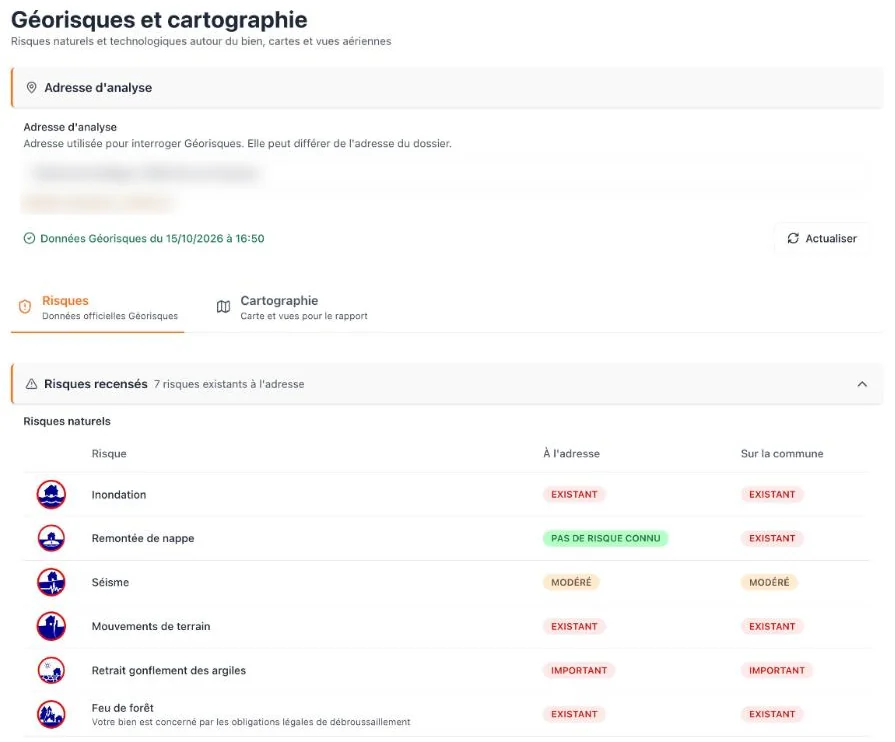
As soon as you enter the address, Tracelia queries Géorisques, the French government’s hazard database. Into the case, ready for the report:
- Natural-disaster declarations for the municipality
- Clay shrink-swell exposure at the address
- Cavities, flooding, seismic zone, ground movement
- Industrial sites nearby
- IGN map and aerial views, ready for the report
The data is dated and refreshes in one click. The address used for the lookup can differ from the case address when the property is hard to locate. The clay exposure map is drawn at 1:50,000: it gives context only, and replaces neither a site-specific geotechnical study (a G5 investigation under French standard NF P94‑500) nor your own findings.
Hazards & mapsFictional case
I. On site
No finding, no analysis.
Everything starts with what you saw. Until a finding is recorded, Tracelia drafts no analysis.
You record each finding as an open observation, or through guided forms for common defects (cracks, roofing, facade, water damage…), and attach your photos. Every text field has a mic: you dictate on site, and Tracelia transcribes.
If the network drops, what you have typed stays on the device and is sent as soon as the connection returns. For finding photos, keep the add window open until the network is back. Creating a finding, dictating or running the AI needs a connection: open the case before you arrive.

Your finding,
dictated on site.
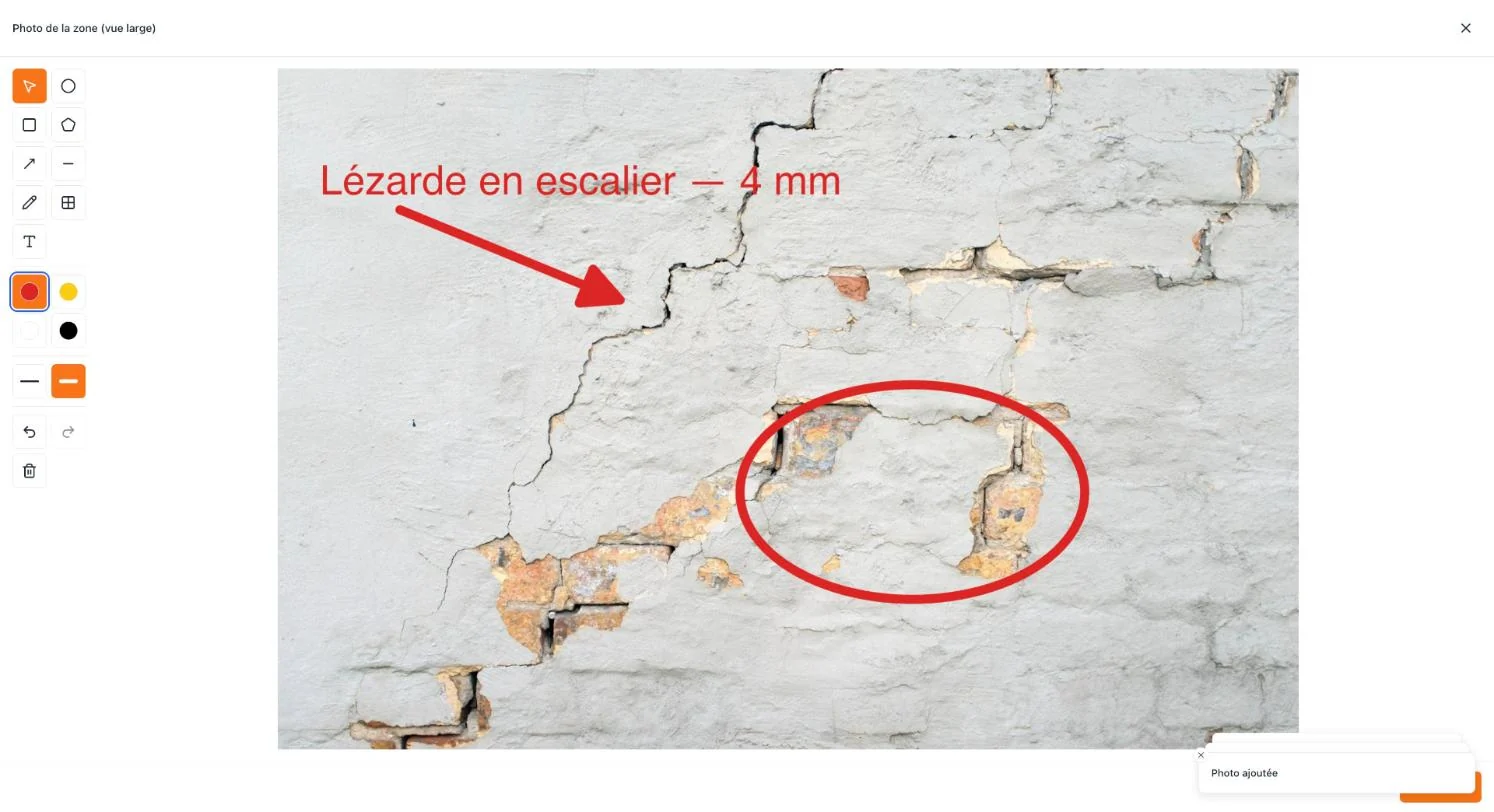
On every image
Show. Label. Mask.
On every photo, attachment or map: arrows, circles, text and the dimensions you measured, to show the defect, and blurred areas for what must not appear in the report (a face, a license plate, a name). The marked-up image stays where it belongs in the case: finding photo, attachment or map.
Area photoFictional case
II. Back at the office
A draft,
not a blank page.
For each finding, Tracelia drafts an analysis that links your observations to a probable cause, and keeps what you observed apart from what still needs checking.
The analysis is tailored to the type of defect and takes the Géorisques context into account. It draws on references it looks up on the web, from NF DTU (France’s trade-by-trade codes of practice) to French statutes; it names them in its text, and you check them:
- NF DTU
- Eurocodes
- NF standards
- Civil Code
- Construction and Housing Code
- Insurance Code
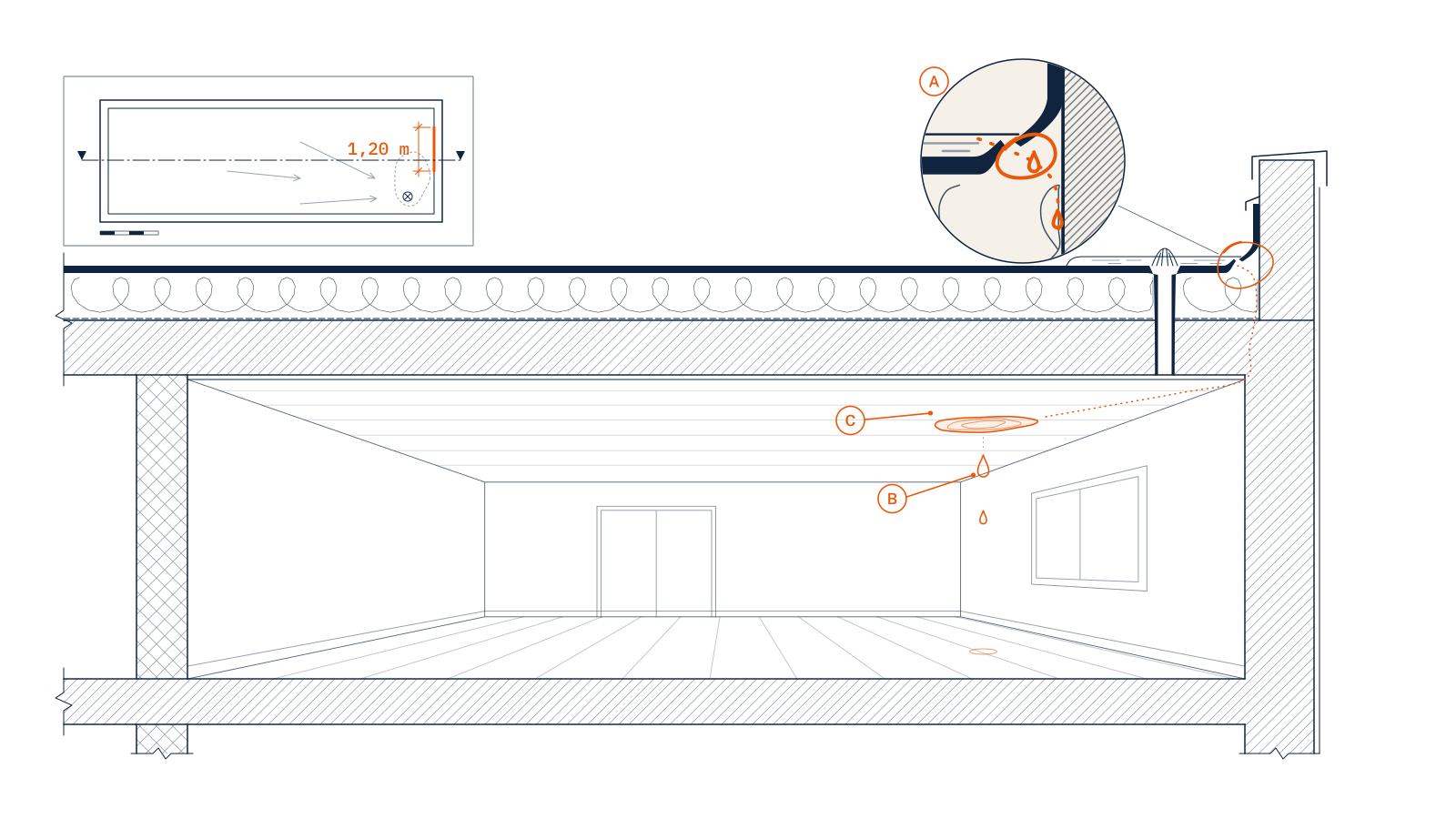
Analyse du constatBase flashing too low, parapet leak
establishedMoisture-meter readings within the 80 × 45 cm ceiling stain are three times those of a sound area nearby.
establishedDirectly above, the base flashing has pulled away from the parapet over 1.20 m and stands only 8 cm above the gravel ballast. Measured slope: 0.5%; a single roof drain, no overflow.
probable causeAt zero slope, the ponding near that drain is not a defect in itself; the flashing is: NF DTU 43.1, France’s code of practice for waterproofing low-slope roofs, requires at least 0.15 m above the ballast. With no overflow, water from a heavy rain can reach the detached section: that is the probable cause.
to be verifiedA localized water test must confirm this path and rule out the drain flange.
limitI cannot establish how long the flashing has been detached, or whether it already was at handover.
The draft is prepared from your findings. You rework it, add to it or have it regenerated, then you approve it: the finding moves to “Analyse validée” (analysis approved).
Editing
An edit reopens what depends on it.
An approved analysis feeds the conclusions, the recommendations, the cost estimate and the report. Before you edit it, Tracelia lists the sections that depend on it.
You know what to re‑approve before you sign.
AI in TraceliaTracelia uses a generative AI model to draft an analysis from your site findings. AI can make mistakes: you review, edit and approve every report, and you sign it as the responsible expert.
Refine
Say what’s wrong. No retyping.
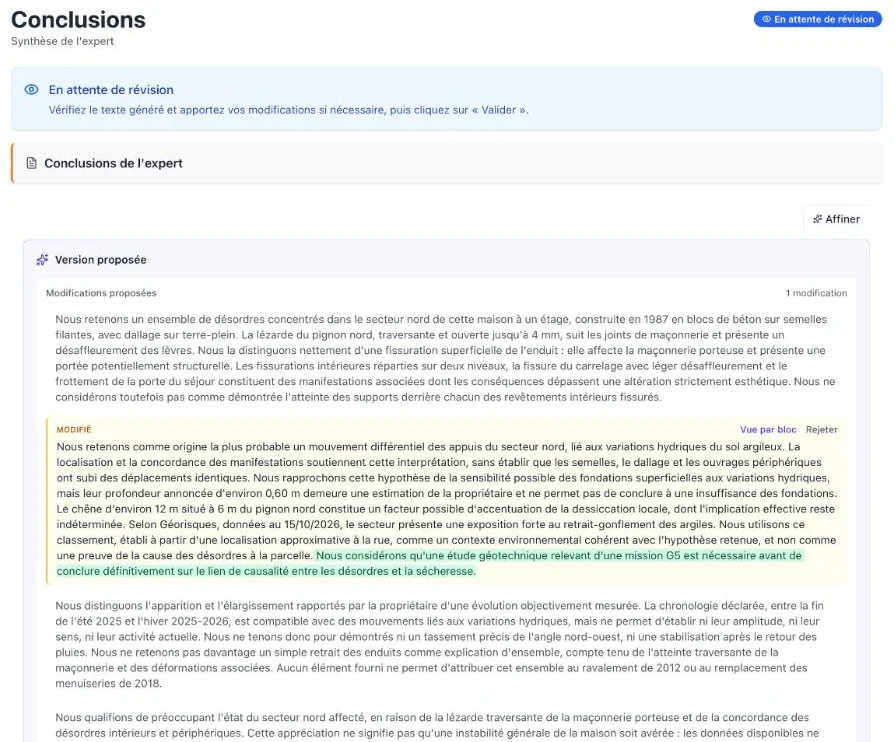
A passage isn’t right? Dictate an instruction (in French, like the interface; translated here): “be more cautious about the origin of the crack,” “drop the reference to NF DTU 20.1 and rephrase.” Tracelia proposes a new version and flags every block it changed.
You compare block by block, keep or reject each change, then approve. The original draft stays as it is until you decide.
ConclusionsFictional case
Conclusions and recommendations
Protect first. Repair second.
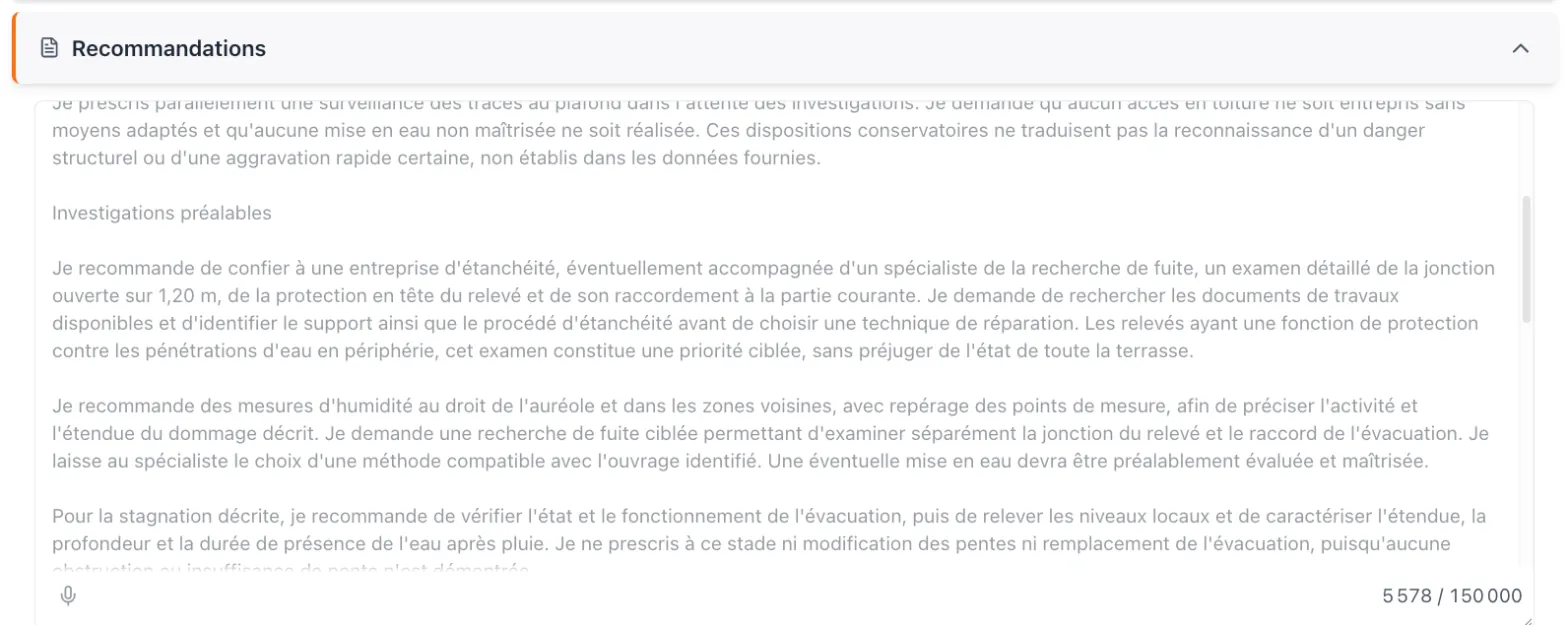
The conclusions are a summary drafted from your approved findings: you edit the draft, then accept it.
For recommendations, you can first record your own expert determinations: immediate risk to occupants, protective measures, and whether a dangerous-building procedure (péril) applies. Tracelia then proposes measures in order of priority: protective measures, further investigations, repairs, maintenance.
RecommendFictional case
Cost estimate
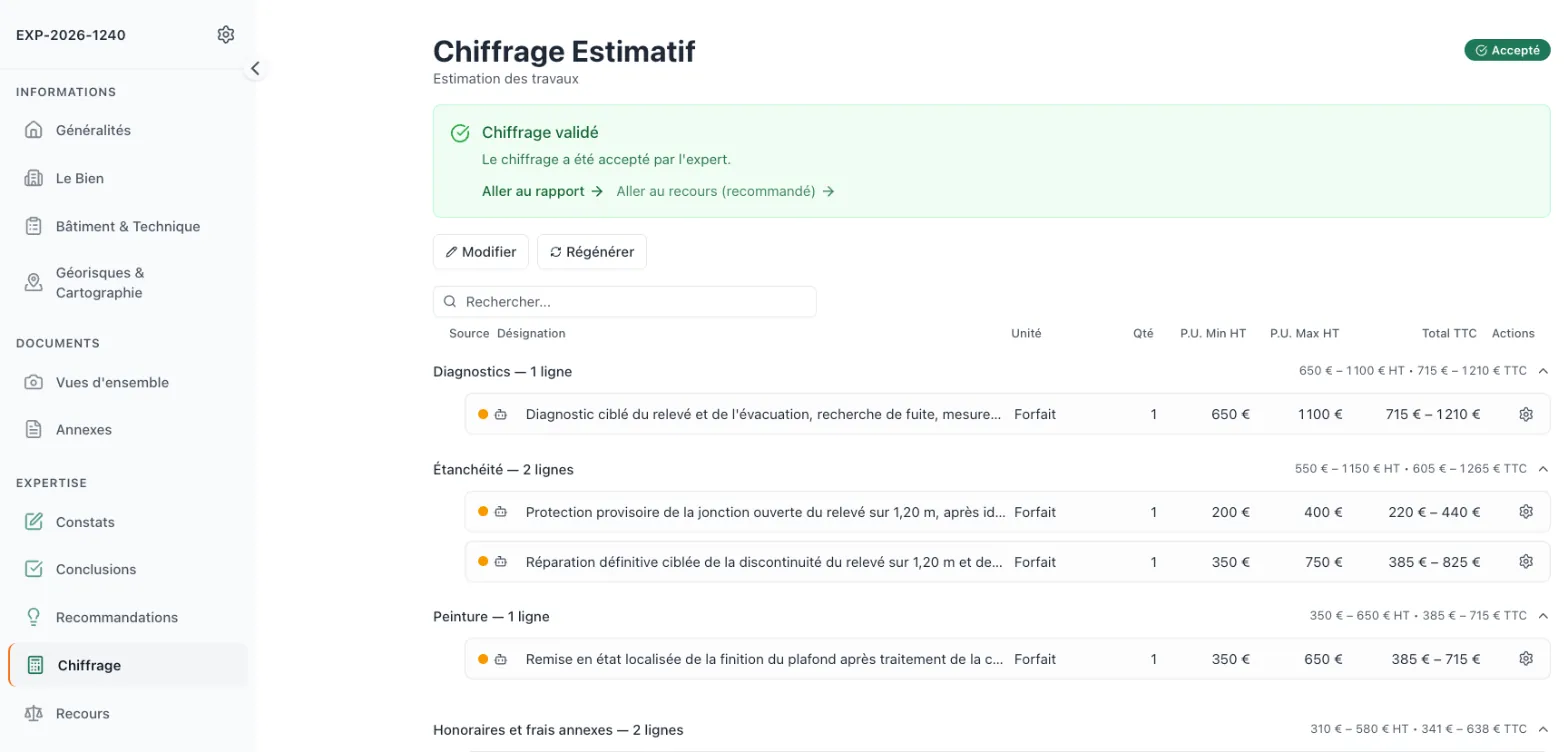
A range for each trade, before the first contractor quote.
Each line carries a quantity and a low and a high unit price, excl. VAT. Totals come out as ranges, before and after VAT, with contingencies and architect/engineer fees; depreciation, when you apply it, is deducted. Each line keeps its origin in view: rule, AI, manual entry or system line.
Expert cost estimate, given as a range; not a contractor quote.
EstimateFictional case
Recovery (subrogation)
Six points to pin down before you act.
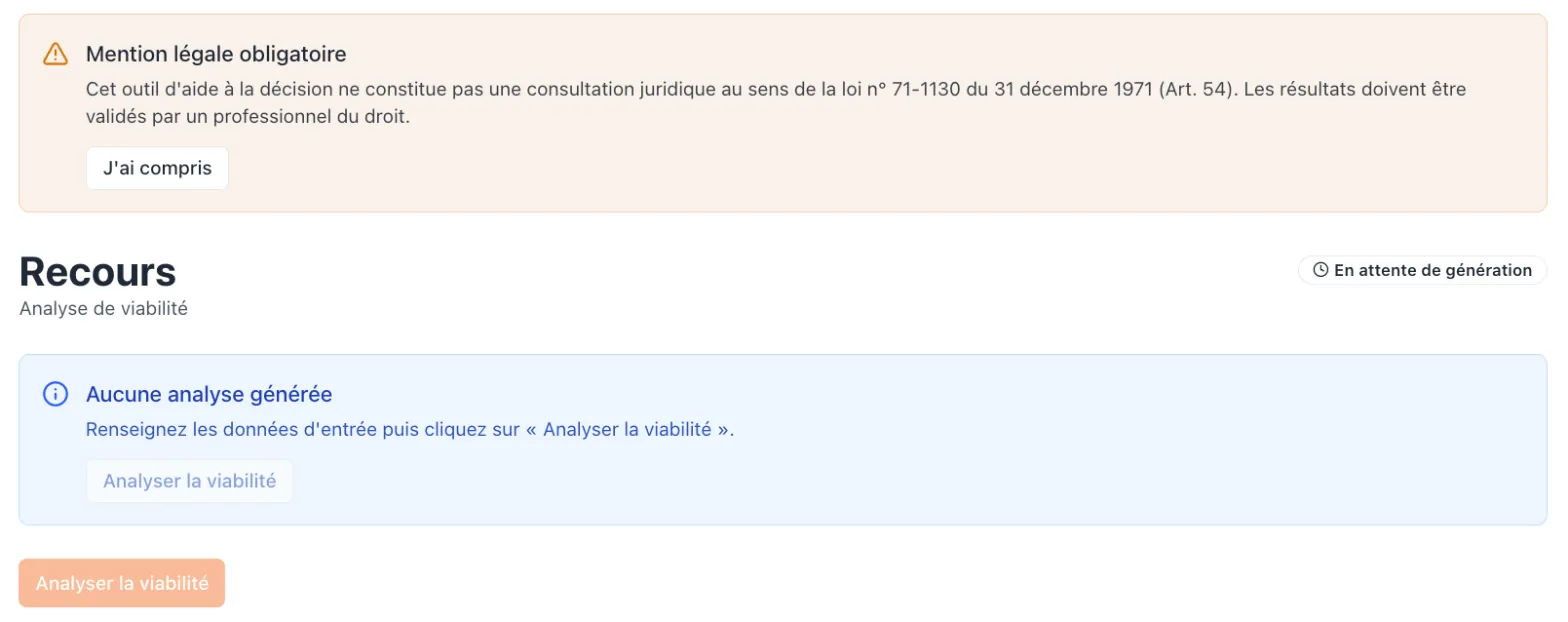
When a case points to a possible recovery (subrogation), the “Recours” (recovery) screen lays it out: timeline, insurance and notice of claim, parties and contract, classification of the defect, statute of limitations, technical context. Then, if the case calls for it, you run the viability assessment: a score out of 10 and a suggested strategy, to be validated by a legal professional. In court-appointed work, the expert gives no legal opinion (French Code of Civil Procedure, art. 238): this screen is for work on behalf of a policyholder or a party.
A legal notice appears at the top of the screen, in French:
« Cet outil d’aide à la décision ne constitue pas une consultation juridique au sens de la loi n° 71-1130 du 31 décembre 1971 (Art. 54). Les résultats doivent être validés par un professionnel du droit. »Courtesy translation: “This decision-support tool does not constitute legal advice within the meaning of French Law No. 71-1130 of December 31, 1971 (Art. 54). The results must be validated by a legal professional.”
Assess recoveryFictional case
III. Sign-off
Set once.
On every page.
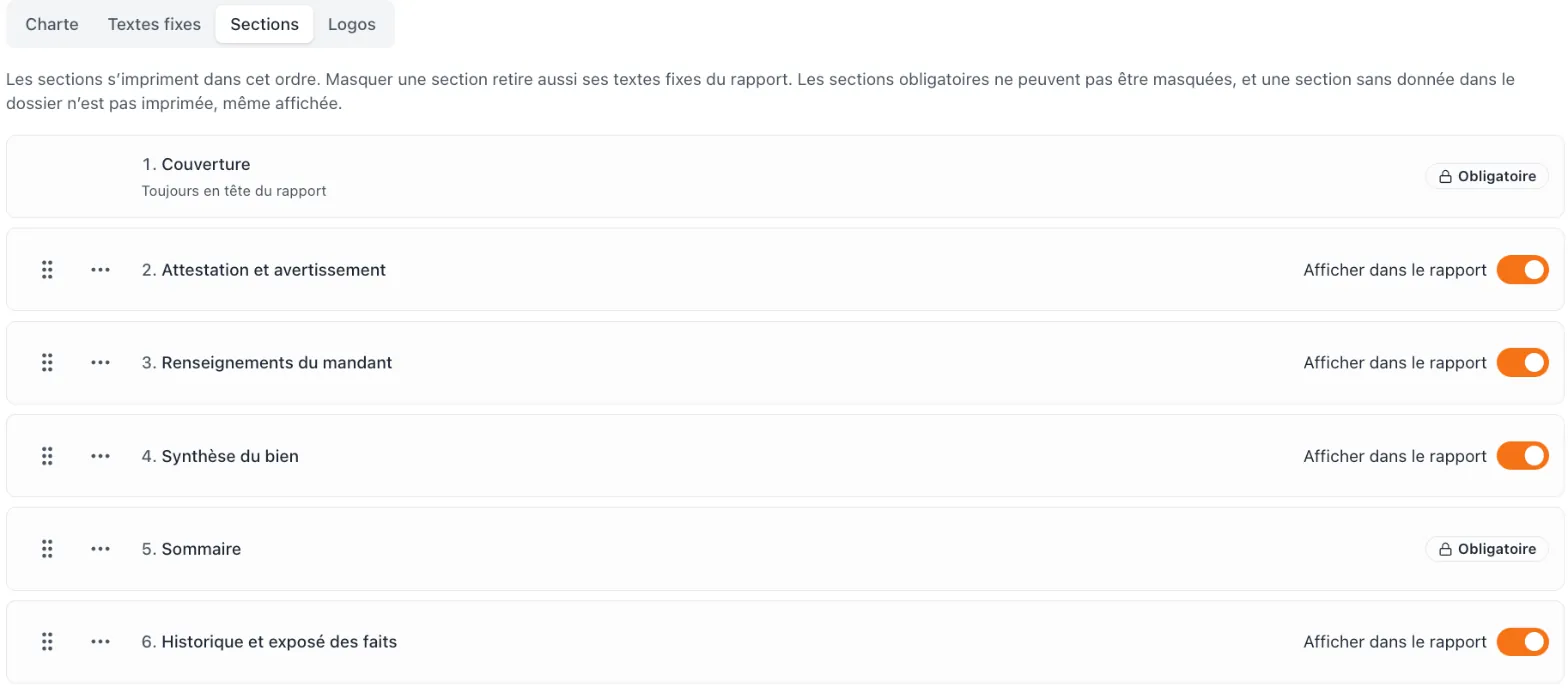
The report can be generated only once the required steps are approved. Each generation creates a dated version, which you download in PDF or Word.
The template has 19 ordered sections, 5 of them required; an empty section isn’t printed. You write your standard wording once: statement of independence, disclaimer, closing page. You choose your colors, one of 6 fonts, your logo and 3 secondary logos. The “Rapport établi avec Tracelia” (report prepared with Tracelia) line can be switched off.
The result, in excerptsCustomize
Roles
Five roles. One firm.
An expert sees the cases assigned to them; office staff can view them all. The technical director runs operations, the administrator manages members; the owner has full control.
Only experts are billed: €49/month excl. VAT per additional expert; office staff, technical director and administrator accounts don’t count. See pricing and Tracelia for firms.
Prices exclude VAT. For businesses only.
ExpertOffice staffTechnical directorAdministratorOwner
Spec sheet
Tracelia, October 2026
- 12screens, in 4 groups
- 19report sections, 5 of them required
- 5roles at the firm
- 3devices: computer, phone, tablet
On site
- Entry
- Open observation or guided form, dictation
- Before the visit
- Géorisques hazards and IGN map from the address
- Weak signal
- Entries kept on the device
- Markup
- Arrows, dimensions, blurred areas
At the office
- Analysis
- One draft per finding: established, to check
- References
- NF DTU, Eurocodes, NF standards, statutes
- Recommendations
- Protective, investigations, repairs, maintenance
- Cost estimate
- Ranges excl. and incl. VAT, by trade; origin of every line
The report
- Template
- Your sections, standard wording and format
- Formats
- PDF and Word, dated versions
- Recovery
- Viability score out of 10
- Check
- Generated once the required steps are approved
1 signer: you.
Questions
Your questions.
Can I edit the report after it’s generated?
Yes. The report also downloads in Word, so you can rework it in your word processor. Generating again creates a new version; earlier versions stay in the list.
Does Tracelia fit litigation work?
The report template and its standard wording adapt to each type of assignment: you write them, and you sign the report. In court-appointed work under French rules, the expert must carry out the assignment personally (Code of Civil Procedure, art. 233): Tracelia only prepares drafts: you review, rework or discard them, and every word of the report remains yours. It has no feature dedicated to the proceedings themselves: notices to the parties, interim reports, responses to the parties’ submissions.
Do I need to install anything?
No. Tracelia runs in your browser, on a computer, phone or tablet, with one account for each person at the firm.
Why does the analysis cite French standards?
Tracelia was designed for French practice. The analysis starts from your findings; for references, the AI looks up the references that apply and names them in its text: NF DTU (France’s trade-by-trade codes of practice), Eurocodes (European structural design standards), French NF standards, the Civil Code, the Construction and Housing Code, the Insurance Code. It can get them wrong: check every cited reference against the current edition before you approve.
What if the network drops on site?
What you have typed stays on the device and uploads as soon as the connection returns. For finding photos, keep the add window open until the network is back. Creating a finding, dictating or running the AI needs a connection.
The case is yours to run.
The sample report excerpts show what these screens produce. Join the list, and we’ll write when Tracelia opens in English.
Tracelia is available in French today. Join the list to hear when the English version opens.